2014 AU Windows Phone Download/Purchase Stats
Back last year I blogged about what types of devices were using my 2013 sports Apps – and noticed a few interesting trends which helped me plan better for this year’s releases. Summary of that post was : a) Nearly everyone has Nokia handsets b) over 56% of those users had 920’s c) approx. 80% were using WP8 handsets d) <5% were using Budget WP handsets.
A couple of weeks ago I launched my Aussie focused 2014 sports apps – AU Footy 2014 for AFL fans and AU League 2014 for NRL Fans. These apps have (thankfully) again been big hits in the Australian Windows Phone Marketplace – currently they are the top 2 paid Apps on Marketplace (AU League held #1 spot for first few days as their season started earlier – and then AU Footy has snagged the #1 spot since then) – on the Spotlight page of (Web) Marketplace where it shows the top 6 paid Apps/Games overall including XBLive – they are at #3 + #6 place – with footy out-downloading the original Angry Birds game. </brag>
Crunching some numbers
Now, with a couple of weeks of good/steady sales under my belt – I’m starting to get enough numbers to do some interesting analysis on what devices people are using, and what their purchase habits are (that’s the bit where I actually get paid). Based on last year’s sales – the sample size is large enough to represent what I can expect to see for rest of season – only shifts may be some early adopters of the new / to be released devices (which likely won’t be on sale here for quite a few months at least).
% of Downloads + Purchases per Device
This table (below) was taken by analysing all the RM-XXX manufacturer numbers coming up in my logs, for those who had downloaded/launched either AU Footy 2014 or AU League 2014 . This of course means devices not made by Nokia are not represented here at all – but since this time around it appears just about everyone (98%+) appearing in the stats are Nokia Lumia owners – I just ignored the others for simplicity. I’ve of course (for commercial sensitivity) also not mentioned any exact volumes – only percentages (as compared to other devices).
I’ll explain what devices belong in which ‘Device Category’ in more detail in next section – however the other columns on this table highlight : firstly how downloads (inc Trial + Paid) are split across different devices, then similarly how Purchases (Paid Versions) are split across devices – and then a percentage which represents what % of downloaders on that device bought the paid version of the app (perhaps the most interesting stat for me).
The Overall Purchase % figure in table footer represents what % of downloaders of these apps actually bought the Paid version – 74.7% – a figure which I’m pretty happy with. 8)
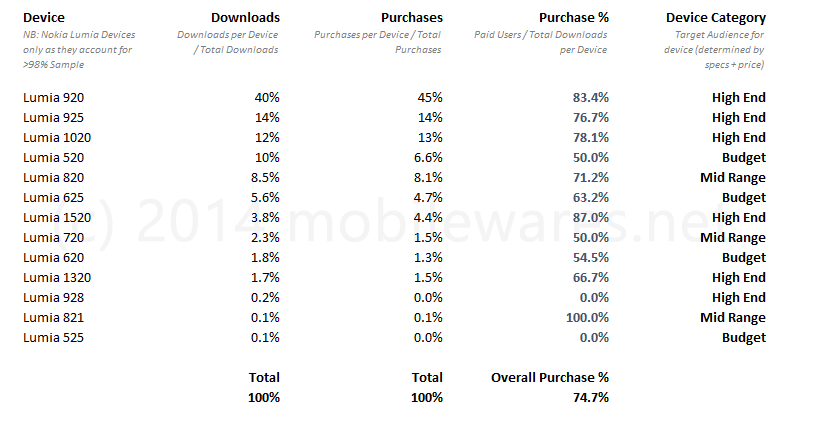
Again (fairly consistent) with last year’s stats – Lumia 920’s make up the lions share of devices (40%) with the newer enhanced models (other ‘High End’ category devices) taking some of their numbers away (such as Lumia 925, 928 + 1020). Also consistent with last year is that the users in this category (High End), also happen to be the best customers – the ones who pay for the app (rather than just evaluating or using the Trial version).
% of Downloads + Purchases per Device Category
This table rolls up the above figures into %’s per category. Of course, what devices belong in what category is probably up for a lot of debate – however my view was that the Lumia 5xx/6xx were considered ‘Budget’ (low resolution, low price, lower memory), the Lumia 7xx/8xx devices were ‘Mid Range’ (low resolution, mid range prices) and then remaining devices were ‘High End’ (HD resolution/premium hw, larger/better screen technology, faster cpu’s and of course highest prices to own). If you look at what devices are being released/announced over past 6 months and immediate future – it’s clear to see that Nokia is very much focusing on High End + Budget devices.

From analysing the figures by category – it’s clear that users of my Apps seem to be predominantly using high end devices – with the budget devices making a small splash (only 17% of recorded devices). Availability / lack of new ‘Mid Range’ devices from Nokia of course means this category is shrinking quite a lot.
Particularly interesting again for me is being able to see where the actual purchases are coming from – with 78% of those being users with High End devices (where 80.8% of these users who downloaded the Apps purchased them). Even though the Budget category made up 17% of all App downloads – only 54.5% of those resulted in a purchase – meaning only 13% of my revenue from these Apps come from Budget devices.
These sort of (low Budget) numbers really puts things in perspective for me when I’m wondering how much additional time/effort to devote during development optimizing the App for these lower power/resolution devices. It also helped me decide whether to optimize the UX for those with small/low resolution screens (ie. large UI elements / less information) vs decent sized HD displays – something that played a big part in the new landing page redevelopment (which packs a LOT of information into a single pivot).
Looking at these numbers from a Average Revenue per device/category perspective – Apps are AUD$2.99 – which means I get paid ~$2.09 per sale (not including any of my running/licensing costs of course which take a very large bite out of what ends up in my pocket). Users of High End devices bring me ~$1.69 per App, users of Mid Range ~$1.40 – and then users with Budget devices are the lowest (least profitable) at ~$1.14 per App. These figures are probably consistent with what you’d expect too – someone spending smaller amounts on their device (or plan) are also probably going to spend less on Apps too.
Reality Check
Of course there’s some important things to note when digesting these stats.
Firstly – these are sales/downloads of Sports apps – and may or may not accurately represent the overall market or demographics of those buying different categories of devices (%’s for games + social apps may be quite different – as they may target a much younger audience less likely to afford high end devices). I like to think that the Aussie sports (particularly AFL) is something that is equally enjoyed regardless of gender, age or socioeconomic status of users – but would need to see figures like these for other types of Apps to really confirm this.
Also, these are figures from the first 2 weeks of sales – so it’s also fair to say that early adopters (who tend to flock to high end devices) are also those more likely to be monitoring marketplace, twitter and other places to find out about new apps and hence more likely to discover/download them a lot faster.
Additionally, given these apps are WP8 only – it’s also fair to estimate that some reasonable percentage of the ‘Budget’ device audience is also still using WP7 handsets (and hence aren’t represented here at all).
There was a lot of noise from Microsoft over past 12 months in regards to the huge new revenue opportunities for WP developers due to greater market share from available budget devices. I’m again very sceptical that this is true for the Australian marketplace – well at least for the sort of Apps I make – it’s certainly not appearing to make a huge impact on my sales at all. That being said, if you’re producing free apps (with ad based revenue) or freemium (addon based revenue) – then the figures again may look quite different.
Some interesting AU Windows Phone ownership stats..
A couple of weeks ago I updated a couple of my popular Aussie Windows Phone sports apps (AU Footy 2013 + AU League 2013) to support Live Tiles (via Azure/WNS Push Notifications) – and a quite a number of the existing users have enabled it since receiving the update.
As part of the subscription process (invoked when a user nominates to receive live tiles), the system has been collecting (non personal) information on the Windows device being used (in order to target the required specs/resolutions for the live rendered tile images and content). This information includes the device Manufacturer/Model and the current Windows Phone o/s version (ie. whether they are running 7.1, 7.8 or 8.0 etc).
I’ve been monitoring these stats (via a stats page I drummed up) and was somewhat surprised at the results I was seeing. Over past few days these stats have stabilized somewhat – with the %’s starting to stay pretty fixed even though many users were still signing up (so from this I think I’ve got a pretty good/representative sample size at this point). The second of these apps (AU League 2013) was delayed by Marketplace certification woes – so although that’s only just been made available – the stats coming in from that app are pretty much identical to the Footy app (and are included in the overall sample).
Apart from the curiosity factor of seeing what’s up in the Australian WP marketplace – these stats of course are invaluable as a planning tool for what WP Devices/Versions and resolutions I need to focus on for upcoming new Apps + App updates.
NB: These apps (AU Footy 2013, AU League 2013) support all current versions of Windows Phone (7.1 through to 8.0) including LMD (Low Memory Device) handsets – so no users/devices were excluded from being able to download or use these apps (available to 100% of devices which can install apps from WP Marketplace). One important requirement to be included in these stats however were that they had purchased the app.
tldr stats analysis
Of my subscribed users/devices surveyed – WP8 now has 80% share and of the remaining 20% less than a quarter of those are running 7.1 (everyone else has 7.8). It appears everyone loves and buys Nokia handsets (87% of market) – in particular the Lumia 920 (56.2% of all devices) – however budget WP handsets have failed to bring any sizable boom in app sales.
Read below for breakdowns of these stats and thoughts….
Windows Phone O/S Breakdown.
The primary interest I had in analysing these stats was to know what %’s of the market have the different WP O/S versions. As an App developer, this is important to me as there’s currently some tough choices and tradeoffs you need to make when deciding what you will target. For example – if you develop a WP8 app you get a lot of extra API functions like lock screen support (that customers are crying out for) – but at the same time you eliminate anyone with WP7 handsets from your potential customer base.
Of devices surveyed here are the breakdowns (percentages round up to 1 decimal place so may not equal 100%).
| Windows Phone O/S | Percentage of Surveyed Users |
| 8.0 | 79.1% |
| 7.8 | 16.4% |
| 7.1 (aka Mango) | 4.5% |
After a year of a lot of device fragmentation since launch – it looks like WP8 is really starting to become the platform to target – with almost 80% penetration. This is pretty good news for developers (and users with 8.0 handsets). The other good news is if developers want to include support for new wide + small tiles in Apps – over 95.5% of devices will be able to use them (ie. those with 7.8 and 8.0 handsets).
Note that some of the 7.1 devices simply don’t have a 7.8 update available (and may never will) – but it’s good to know that ~80% of 7.1 users have updated their handsets so far.
Windows Phone Manufacturer Breakdown.
Knowing which manufacturers are moving handsets is probably more of a curiosity – however the results were quite surprising. Whilst it was probably pretty obvious Nokia was the dominant player in the WP space – I hadn’t realized just how large this market share was.
Of devices surveyed here are the breakdowns (percentages round up to 1 decimal place so may not equal 100%).
| Manufacturer | Percentage of Surveyed Users |
| Nokia | 87.1% |
| HTC | 11.1% |
| Samsung | 1.6% |
| LG | 0.2% |
Yes – you read that correctly – Nokia have a massive 87.1% of the WP market – a staggering lead (and well deserved). Everyone else is an ‘also ran’ with HTC making the only meaningful indent into the market.
Windows Phone Handset Breakdown.
Again quite a few surprises here. From the figures observed – it seems that the high end devices are definitely the ones of choice for users – and the budget handsets from Nokia + HTC seem to be hardly making any indent at all. It turns out over half of the market actually own Nokia Lumia 920’s – that’s awesome!
Of devices surveyed here are the breakdowns (percentages round up to 1 decimal place so may not equal 100%) – here are the Top ones..
| Handset Model | Percentage of Surveyed Users |
| Nokia Lumia 920 | 56.2% |
| Nokia Lumia 800 | 10.7% |
| Nokia Lumia 820 | 8.8% |
| HTC 8X | 4.7% |
| Nokia Lumia 925 | 3.2% |
| HTC Mozart | 2.4% |
| Nokia Lumia 620 | 1.9% |
| Nokia Lumia 520 | 1.6% |
| Nokia Lumia 900 | 1.5% |
| Nokia Lumia 710 | 1.5% |
| Nokia Lumia 720 | 1.1% |
| HTC HD7 | 1% |
Other handsets with Marketshare of 0.5-1% included : HTC Radiant, HTC 8s, Omnia 7, Samsung ATIV S, HTC Titan, Nokia Lumia 610… Many other handsets showed up in the sample too – but had such small numbers I won’t mention them here.
At least one user had a Nokia Lumia 1020 (I’m very jealous).
However, I was somewhat disappointed by the really low numbers for the budget WP devices (such as Lumia 6xx/5xx devices and the HTC 8s) – which only accounted for around ~5% of the sample.
As a WP developer – I like others was looking forward to the anticipated growth in WP market share that these devices were going to bring (which would of course – we hoped – mean lots of new users and potential customers). These figures tell me something completely different though – it’s not made a whole lot of difference to my revenue as a developer – and that’s not great news.
Keeping in mind that this sample is of users who have paid for my app – live tiles aren’t available to trial users and there’s no free version – there’s a couple of potential conclusions I can make. Either not many of these devices are being sold – or potentially more worrying (and maybe more likely) – the people that buy budget handsets don’t buy Apps (as they are on a budget / can’t afford it or can’t meet necessary payment requirements).
Again – neither of these conclusions are a win for developers – and also makes me question the value in spending a lot of time optimizing apps for LMD and other low end devices.
I’d love to see some figures like this from developing markets (and free apps) – as these would be far more influenced by the affordability of apps vs the average disposable income (and would further help determine if a large influx of budget WP handset owners does actually result in large increase in sales of Apps).
Windows Phone Screen Resolution Breakdown.
Something again quite important for developers to consider is to ensure they target the available resolutions on devices (so High Resolution 720p/WXGA devices aren’t using low resolution image + media assets).
There wasn’t too many surprises here (given the dominance of the Lumia 920 which does WXGA resolution). The bad news is the low resolution WVGA devices still make up a pretty large slice of the market (so developers won’t be able to dump your low resolution graphics assets from apps just yet).
Of devices surveyed here are the breakdowns (percentages round up to 1 decimal place so may not equal 100%) ..
| Screen Resolution | Percentage of Surveyed Users |
| WXGA (720×1280) | 59.4% |
| WVGA (480×800) | 35.1% |
| 720p (1280×720) | 5.4% |
Other Stats…
As part of storing Live Tile Push configurations for users on the server – I have also been inadvertently tracking what teams people barrack for (as the server needs to know what team tiles to issue as part of the payload).
I probably haven’t got enough users on board for the NRL app (update only appeared yesterday) but those of you who are into AFL footy will be interested (or disappointed) to learn that the most popular teams are – Essendon (~15%), Collingwood (~12%), Carlton (~12%), Hawthorn (~10%), West Coast Eagles (7%). I guess the Essendon supports have quite a lot of live news requirements right now so this app may be more important to them 8P.
I hope you found this enlightening – probably only of interest if you’re an app developer or an Aussie WP enthusiast – and I’ll continue to monitor these stats in future and see how my customer base evolves in the Australian market.
Windows Phone vNext Collateral Damage – A Developer Story…
I managed to get hooked into an interesting debate on Twitter yesterday regarding whether you’d advise someone you know to buy a Nokia Lumia 900 with WP8 just around the corner. This conversation stemmed from a local AU tech journalist awarding the device 5/10 in a review and then later mentioning that the impending release of WP8 was justification for this score – not that the device was that bad). The discussion touched on a fundamental topic I’ve had burning in the back of my brain for some time now – surrounding the impact of Microsoft’s Windows Phone vNext announcements on the existing Windows Phone market.
Apple vs Microsoft vNext Announcements..
While progress and new device/platform announcements are generally an exciting thing – we’ve seen a fairly important differentiation between how Microsoft and Apple execute these with respect to their Phone platforms + hardware.
In most cases – Apple keeps announcements completely secret right up until they hold a major news conference – and then when it’s announced – they demonstrate a finished product ready to sell – accompanied by clear and precise launch dates (normally very short time frames) – so customers know exactly what’s going on. Sure there’s a bunch of rumours leading up to these announcements – but generally they are very far off the mark and the public don’t take them seriously until the real announcement is made.
Microsoft Windows phone announcements on the other hand happen quite differently – in that major Windows Phone updates are announced a long time before they are released – and it’s the platform improvements that are shown off with an early reference device. In almost every case I’ve seen – there is no actual hardware announced – only vague release dates for handsets are given, which are normally a long way off (generally 3-9 months staggered across various regions). Then there’s a non stop barrage of rumours on what’s going to happen / be released – many turning out to be completely true as they generally come from very good sources.
For customers wanting to buy into either of the platforms – Apple’s way gives them a clear decision – ‘Buy vCurrent or wait until next month/week and get vNext’. Microsoft’s customers on the other hand are faced with the through process of ‘I’d like one of these now – but they did announce vNext was coming at some point soonish so I’d better wait until then’….
vNext versus the vCurrent App Publisher..
The problem for App developers is that they are only at any point making their revenue based on what’s out there right now and available to the general public – and due to the once off App ‘purchase for life’ model on Windows Phone 7.x – sales are very much pinned to how Windows Phone is doing at retail (and ultimately how many new customers are made available to them over time).
Unfortunately – every time the proverbial vNext carrot is dangled in front of the public – vCurrent handset sales stall – creating more confusion + bringing in less customers – and resulting in reduced App sales.
I’ve been deeply suspicious that this has been going on for a while – and thought I’d chart out my daily app sales in the Australian Marketplace versus the various major Windowsphone events related to me (such as vNext Announcements and then other events specific to me or to the AU Market).

Just to explain the numbers you are seeing above – these are the combined total of sales across all mobilewares.net Windows Phone 7 apps in the Australian Marketplace (from Early 2011 through to now). I’ve been lucky enough to have some of the top selling Apps in Australia over this period (including AU Weather Pro and also a bunch of AU focused Sports titles) – some of them I would like to consider to be ‘must have apps’ to Australians – and am confident a fairly consistent % of new users to the platform will purchase them.
I should also mention that my Apps ranking on the top (selling) charts in AU have been pretty much consistent for quite a while (AU Weather Pro has been top selling non XBLI title for a long time + the sports titles have been the top 3 ranked in their genre since launch) – so I’m also reasonably confident the quantity of Apps I sell is pretty relatively close to the trend other publishers in this region are seeing.
Due to the commercially sensitive nature of these actual figures – I’ve simply referred to the quantities with a unit system of ‘x’. Ie. ‘2x’ point on graph is exactly double the amount of units of ‘x’. The charted line is also a ‘line of best fit’ from the charts produced by the App Hub – the actually line per each day is a very zig-zaggy line – sometimes going below/above the line of best fit due to interim events (like having an App as the ‘featured app of the day’).
Also please note : This is not meant to be a scientific observation – I’m sure those that concern themselves with market predictions and analysis as their full time job have much more sophisticated metrics and models – I’m just going by what I have in front of me..
The Impact of vNext Announcements
From analysing my chart there’s a very obvious effect I’m seeing as a result of vNext announcements/leaks (denoted in the Red Callouts above) – App sales take a swift and sudden downward turn (which I’m very certain is a direct reflection on handset sales). The three significant events have been the Mango/7.5 announcements, the leaked WP8 announcements late April (indicating WP7 handsets would have no upgrade path to WP8) and then the nail in the coffin the official WP8 announcements in June.
I’ve also mapped out good/positive events on this timeline (denoted with green callouts) – such as new app launches from my company (which of course drive sales), handsets actually being released in AU – and major marketing initiatives namely the Nokia Lumia launch (which was accompanied by a lot of really well done TV advertising and public awareness campaigns).
The disappointing bit is that WP7 really looked like it was taking off this year with the Nokia launches – and was obvious traction was finally being gained. That sharp rise in market share was however killed with the WP8 announcements (and no actual firm dates for availability) – in an even more comprehensive manner then last years Mango announcements (even though it took Australian’s close on 10 months to actually get local Mango handsets it was only a few features being sacrificed and there was no threat of it being completely obsolete that we face today).
The really bad news for devs… fragmentation is coming to a market near you…
While It’s not hard to deduce that things are not going well for Windows Phone platform (market share wise) – I’m pretty certain things are going to get quite worse in the short to medium term – particularly for App developers. When Windows Phone 7 appeared and up to now – Microsoft’s overall market share of the phone market hasn’t changed all that much – and what’s slowly happened is the % of WinMo 6.x users versus WP7 users has slowly changed (to today when the WinMo users are only a small percentage – many of them actually going to a different platform altogether).
I think it’s quite possible we may see the same transition happen with WP7 > WP8 users (with not that much change for Microsoft’s overall Smartphone market share) – so for a developer this fragmentation is not great news. Apps designed for WP7 will be faced with a potential user base that’s contracting quite rapidly (of which this started a few months ago) – and apps designed for WP8 will need to wait quite a while for enough customers to appear.
Although not a 100% certainty – my gut feel is that customers purchasing Apps on WP8 won’t be that keen to shell out for WP7 titles (even though they ‘will work’) – and instead will wait for WP8 Apps which take full advantage of the platform/resolution and features. I’d be interested to see what the game sales figures were for consoles which provided legacy support (such as the PS2 allowing PS1 titles to be used) – sure many ‘existing’ owners would have been happy – but doubt many rushed out to buy new PS1 titles to use on their PS2.
As someone who has invested a lot in the Windows phone Silverlight/.NET platform – I’d really hoped to get several years out of the code, designs and infrastructure I’d put together for my Apps (which I’d thought would eventually make the investment worthwhile) – however being faced with starting again from scratch is daunting – not to mention risky as there’s no guarantee Microsoft won’t decide in a year or so that WinRT is also going to be superseded with something else. Having done quite a bit of WinRT work already (for Windows 8) – I also know first hand that porting/migrating apps from SL on WP7 is not the simple task it’s claimed to be (as the XAML/layout is so different you really need to start from scratch to make experiences which customers really want).
I do realize Microsoft really did need to do a ‘reboot’ on their entire Smartphone strategy – however this many reboots and poorly timed announcements and leaks is not a great thing. Their actual development platform is so much better then anything else on offer (Android/iOS development environment feels like taking a step back into the 90’s) – but without a worthwhile market for devs to sell Apps to – it’s a hard to justify it.
The one shining light is that the Win8 market is hotting up and will help many developers subsidize their WP8 titles by sharing technologies – but time will tell on whether it pans out this way or those devs just focus on Win8 only. I’m still very much undecided on these counts myself – and while I know I’m sure I will release some Apps for WP8 – I doubt it will get the same energy I once gave WP7 – and my focus will be mainly on Windows 8.
Launched : AU Weather Pro + AU Newswire for Windows 8 Metro
Today was a pretty big day for me – as it marked the ‘official’ debut of mobilewares into the Windows 8 Metro/RT space – with 2 x titles (AU Weather Pro + AU Newswire) appearing in the Windows 8 App Store launched with today’s ‘Windows 8 Release Preview’ launch.
I was caught a bit unaware/unprepared for the the actual release this morning – so have not yet had a chance to get the new Windows 8 section of my site up and live where I’d normally provide details of my apps. Luckily for me AU Weather Pro was featured on the AU Store start page today (along with the SBS On Demand app – which is sortof like ABC iView but all metro goodness) – see https://twitter.com/techAU/status/208354899954642945/photo/1 for a snap shot (big thanks to @TechAU for posting this pic on twitter – hope they don’t mind me linking here).
Both apps have been ported from Windows Phone 7 platform – and when I say ‘ported’ that’s really only referring to some of the underlying ‘business logic / data services’ – as the UI layer in Windows RT and the type of user interactions being targeted for is just a whole different beast. (nb: In fact I would go as far to say that the suggestion by anyone that you can ‘just port your wp7 apps across to win8’ – is generally a pretty sure fire indication that they’ve never actually done it themselves).
It’s also important to note that both these apps are currently considered to be ‘Release Preview Editions’ – and although I wasn’t really allowed to mention this point in my app or App Store description (due to some strange certification rules) – they are basically ‘previews’ of some of the features you can expect to see in the final versions (aimed at the GA release of Windows 8).
So for the time being they are both completely free / free of any advertising – and yours to play with – warts/bugs and all. I will of course try to get some updates in over next few weeks/months, gradually adding features – and moving towards what the final product may look like (until then you’re all part of one big experiment #evillaugh)…
AU Weather Pro :
AU Weather pro displays a lot of similar information to the WP7 sibling (ie. BOM observations, forecast, Radars etc) – but the UI, flow, interaction and presentation is quite radically different (and I very much ‘re-imagined’ the whole experience from what the WP7 version had). Rather than having a lot of drill down pages (hanging off a central observation summary or forecast) – the widescreen/panning content groups all the information about a particular location in one place.
The way you do your settings and find locations is also quite different – basically mostly controlled by either location services lookups or entering a postcode (or suburb name).
Here’s a few screenshots below of it running in Landscape mode (it also supports portrait, snapped and filled views) – using the resolution/scaling found on the reference 10.3” 720p tablets.
Online Windows 8 Marketplace Deep Link : http://apps.microsoft.com/webpdp/en-AU/app/au-weather-pro/7b4f55b8-6e4c-48a8-8789-b29b9c1f892d


AU Newswire :
This app was probably a lot simpler/faster to get going – as unlike AU Weather Pro (which had some quite unique types of information to present) – the traditional Windows 8 panning grids/lists design being promoted via the template apps worked pretty well with it to begin with.
One of the new things I added (over the functionality in WP7 version) was the ability to tell the app which Australian State you reside in – and it then filters the available default topic feeds and ‘suggested other feeds’ (ie. If you say you’re in Victoria it will show you feeds from Herald-Sun, TheAge, ABC Victoria etc – whereas NSW users will be offered content from Sydney Morning Herald etc).
Another feature I added was ability to download an updated catalogue of feeds from the settings – so that way I can correctly handle changing RSS feed locations over time without having to deploy new versions of the app. (in fact there’s already an updated feed catalogue offered from what was submitted to the store with the app).
The look+feel of the app is also quite different to the WP7 version and tries to create a black+white/print style feel. See screenshots below :
Online Windows 8 Marketplace Deep Link : http://apps.microsoft.com/webpdp/en-AU/app/au-newswire/9e416d1f-f961-4934-a275-a28a7c17f8f8


Some thoughts for those about to rock (that is ‘those wanting to get some Win8 apps on the store’).
There’s quite a few gotcha’s for Win8 Development I should mention– particular for the RP version + submitting to the store.
1) If you ‘think’ you’ve got everything 80% there on Windows 8 CP build – you can’t just recompile for RP. There’s a massive amount of ‘subtle but painful’ changes – such as virtually every ‘allegedly’ constant Resource name for colors/brushes being changed slightly (and there’s no direct mapping for many). Additionally the logic and structure if you’re using the LayoutAware base class on pages has changed quite a bit – so you’re best off re-creating every single page in VS2012 and importing XAML and code behind into the new structures (making use of the LoadState overrides to initial everything – instead of OnNavigatedTo etc as you may have done earlier). In fact as a rough guide – it took me around 4 days to ‘recompile’ these apps for RP. (and quite a few XAML bugs were actually introduced – which I hope but doubt were fixed for the build released today).
2) If you’re about to ‘port’ from WP7 – reality is you can’t (unless you want your apps to really suck and fail certification) – and keep in mind a Win8 Metro apps is really about 4 times as much effort . Putting aside the completely different XAML layer/controls, .NET v4.5 framework changes, missing core classes (things are quite different and use cool new async based classes/code which is really nice but NOT compatible with your own code) – Win8 apps must work in Landscape, Portrait, Snapped and Filled views (requiring a lot of fancy footwork to adapt the layout) and then to make things really tricky – the screen scaling (based on the screen pixel resolution and the actual physical size) needs to be handled in a number of ways. Oh and then they need to support ALL of touch, pen, keyboard and mouse input – so this may throw many of your original designs sideways too. Then of course you need to redesign the user experience so more content is shown on each page (as you don’t have the limited screen real-estate you have on a wp7 device – with the exception of ‘snapped’ view which is kind of similar).
3) Certification is hard – really really hard. I’m hoping things improve for new developers signing up over the next few months – but for those of us who battled it out to get apps approved for the RP – it was a very hard slog. Apart from the certification rules not being actually documented in full anywhere just yet (was getting failed on points I didn’t even know existed – such as requiring an Age rating of 12+ because app had used location services) – like with the initial WP7 Marketplace launch – it’s clear the testers themselves have a bunch of different interpretations of the rules. Both apps each failed certification 3 times before they were passed – and each time I was given only a certification clause number a no explanation at all (and suspect I was given a hail mary the last time around lest the RP store launched with no apps at all). Let’s just say certification involved a week of pulling my hair out and several times I almost just gave up and put it in the ‘too hard I’ll come back in 6 months when they sort it out’ basket (really big thanks to some local/regional guys at Microsoft who helped me through this and restored my sanity).
4) There’s still quite a few bugs – hopefully some of them were ironed out for todays build (have not checked yet) – and others are possibly going to be sorted with finalized Display drivers. One which stumped me totally for a whole week (and seemed to first appear in RP) was that 8 bit transparent PNG’s won’t work properly (transparent pixels would turn black after 3 seconds) – the fix for that was to set images as being 0.99999 opacity instead of 1.0 (don’t ask me why but it worked). Another which caused a lot of grief – was using the GridView with Item template containing Variable Sized Wrap Panel seems to throw a berko when panned with touch – if you have groups with different sized items (I had one group with large tiles and another group with some smaller tiles that were shorter height wise). I actually had to redo the entire page and recreate the experience the GridView *should* have provided by using a scroll panel with child stack panels.
Anyhow the lesson learned is that it’s ‘still a beta’ (as is certification and everything else) – so expect the completely unexpected – and make sure you test everywhere (many bugs didn’t rear their heads until I used simulated touch on the simulator or threw it on the Series 7 slate). Then get any timeframe you had in mind (particularly if your first attempt) and multiply that by about 3 or 4 – there’s likely to be a massive learning curve involved.
But don’t worry – no pain no gain – and I think when I get going on app #3 I will used my newly gained knowledge of what ‘not to do’ to a big advantage and will hopefully be making the right design/functionality and UX decisions up front (rather than scaling back original ideas after failing to get them going to my satisfaction).
Anyhow I hope this is a new platform I can grow to love – and the end results seeing my apps running on a Samsung Series 7 Slate were likely getting that perfect golf tee shot (golf hacks like me will get what I mean here).
Oh and if you’re up and running with the RP release – be sure to give my apps a shot – and if you’re feeling generous stop in to the store and give me a nice review too (5 star reviews make me quite warm and fuzzy!).
Big Screen EPG Renewals system is Live..
It’s been almost 2 years now since Big Screen EPG for WIndows 7 Media Center went on sale for the first time– and that means the first batch of paid/subscribing users are almost at the end of their 2 year subscription period.
Up until now there wasn’t any easy way to resubscribe using the same serial number (as of course no one needed to yet) – so I spent a bit of time upgrading the purchase system to handle this functionality.
The Renew feature has been added to your bigscreenglobal.com account page (just click on ‘Account’ once you’ve logged into your account) – so just click on the appropriate link (next to the subscription you wish to extend) – and it will take you through the purchase wizard with that subscription selected.

Discount for Early Bird Re-Subscribers (+ a small discount for those who aren’t as quick)
As a reward for those who’ve gotten behind this product and previously purchased it – I decided to offer a special discount to those who are renewing (applicable when you renew an existing Big Screen EPG license).
First up there’s an Early Bird discount – which gives you 25% off the original RRP (USD$19.95). This discount will be automatically applied when you go to renew your subscription from now up until 14 days past the expiry date (for example : If your license was due to expire on 1st August 2012 – you have up until 15th August 2012 to get this Early Bird discount)..
If you miss out on the Early Bird discount – then a smaller discount of 10% off the original RRP will be automatically applied to your purchase.
Note that you don’t need any special discount code for these – assuming you’ve clicked on the Renew link – the site will work out which discount you are eligible for and apply it.
Once you’ve renewed – don’t forget to load the Big Screen EPG configuration tool and re-activate your product so that it picks up the new expiry dates.
Notes on Windows 8 support
For those that missed it earlier – there is now a Windows 8 specific version of Big Screen EPG (released along with the v1.5a windows 7 version update back in March of this year) – and available for download right now on the Big Screen EPG product page. If you’re not sure if you are going to upgrade – or you’re running the WIn8 CP (Consumer Preview) – and you might go back to Windows 7 – the good news is the Big Screen EPG license is allowed to be used on both WIndows 7 and Windows 8 (no need to purchase a separate license). As it’s a family license – the main rule is still you can run Big Screen EPG on up to 5 pc’s inside your house – and it doesn’t matter if they are Windows 7 or 8 versions.
Thus far although the Windows 8 version is officially considered to be an unsupported beta product (as is Windows 8 CP) – it appears everything is working as it should – I’ve been personally running Big Screen EPG on Windows 8 CP for over 3 months now and it hasn’t missed a beat. Further good news is that all indications from Microsoft are that what you see in the Windows 8 CP is the exact same build/version of Media Center that you will see available with the final release of Windows 8 later this year (so nothing is expected to break or require further work in Big Screen EPG when that does happen).
The bad news of course (for HTPC enthusiasts) is that Microsoft is all but strangling the Media Center platform to death with their recent decision to remove it from the intended Windows 8 o/s SKU’s and make it an additional addon only (which also requires you update to the Professional SKU of Windows 8 before you are eligible). For this reason it’s entirely likely many of you who are giving Windows 8 CP a spin on your HTPC machines may revert back to Windows 7 if you are forced to pay a whole lot extra for it at release.
So anyhow that’s the news on Big Screen EPG – so don’t forget to go and renew your subscriptions before they expire and you lose your ‘Pro’ features from the product (or do so within 14 days post expiration to get the Early Bird discount). Also don’t forget to re-activate your installed versions to pick up the new subscription expiry dates if you renew!
New Developed Down Under Submission Pages Go Live..
The official Developed Down Under website went live a couple of weeks ago – and for launch we hadn’t yet added the new developed opt-in/submission process (which was still pointing at the original page on the wpdownunder.com blog).
So after a bit more tinkering and testing this part of the site is now live too – and should help make the signup quite a bit less tedious and user friendly.
You can check it out here at – http://developeddownunder.com/developers.aspx – or just click on the ‘submit your apps’ whilst on the site.
New Submission Process Overview
The idea of the new submission forms was to make it a smidgen quicker/easier for developers to include their apps – by adding in a few server side smarts and some more fancy validation of entered information.
One new cool thing is the ability to locate all your apps without having to dig out a Marketplace Deep Link for each and every app you’re submitting. Now on the new signup – need to only provide a single Marketplace Deep Link (for at least one of your apps – even one you aren’t planning to submit).

Once you provide a deep link – the website will go off behind the scenes to Marketplace – and fetch all your apps (by using the Publisher ID in the deep link you submitted) – and then displays them so you can quickly just tick the ones you want.

Once you fill out the rest of the information (your name + email are required – website/twitter info is optional) – you are taken to a confirmation page where you can finalize your submission.
Then when you hit the confirm button – we’ll get notified of your submissions and you’ll get notified too via an email. Note that we will still need 24-72 hours to approve/moderate your submissions before they appear in the catalogue (for those using the DDU Windows Phone app).
What’s next for the DDU Website
While there’s no definite timeframes – we intend to start including more features in the website as time permits – such as providing an online version of the catalogue (so you can browse them on the website without the DDU app) – and the ability to find out more about publishers.
Keep an eye on the website for more..!
Developed Down Under Hits Windows Phone Marketplace
I thought I’d post something here about a new community initiative relevant to Aussie Window Phone users, developers and bloggers called ‘Developed Down Under’ – which officially went live to the public around 24 hours ago.


So What is Developed Down Under (aka DDU)
The idea was originally conceived (just over a month ago) by Scott Sheedy from wpdownunder.com to deduce a way of grouping together and promoting Windows phone apps from Australian developers. Garry Holden from Handiware suggested the name ‘Developed Down Under’ (which we ran with after consensus on twitter).
some of the goals of DDU included
– To improve visibility of App’s on the Windows phone platform that have been made by Aussie Developers.
– To help Aussie Windows phone users quickly find and locate Apps directly relevant to their local Aussie market – and have an easier way of identifying these products when looking at blogs, news sites etc (ie. coming up with a recognizable logo/icon and name)
– And similarly to what is being done with Apps – promoting local Aussie bloggers and news Sites who cover Australian specific Windows phone news.
And an App is born …
Last week the concept evolved from an idea (and a lot of behind the scenes work by Scott) – into a full blown Windows phone app (with inspiration from products like wp7nl, appflow, etc).
This product allows users to view a catalogue of Aussie Developed Apps – and then click through directly to that App’s page on Windows Marketplace (where it can be downloaded/purchased/rated/etc). There’s sections such as ‘Apps for Aussies’ (which filters out a list of apps purely designed for localized Aussie stuff like news, travel, weather etc) – and ability to browse by publisher, genre and get randomly selected ‘quick picks’.


On Wednesday night last week – Scott put out a call to all developers (http://www.wpdownunder.com/?p=4639) to nominate their own apps to be included in this catalogue (nb – this is where to go if you want your apps to be listed – it’s a live/online catalogue so we can add you in at any time) . Due to concerns with privacy/copyright issues – it was determined that simply auto including titles may cause numerous issues (and also that there was no simple way to determine which publishers on Marketplace where actually from Australia).
And by Thursday night last week (after I spent a whirlwind couple of days developing it and setting up all the required server side magic whilst Scott simultaneously put together the other required pieces) – the initial app was done and dusted and certified to marketplace.
You can see the App’s product page at : http://mobilewares.net/DevelopedDownUnder-WP7.aspx
Keep in mind of course it’s an initial release (0.9) – and the focus was to get something out there – so lots of bells + whistles that we didn’t have time to include will be added in coming versions.
An Amazing first Day Launch…
Last night (around 8:30pm) – after receiving a publishing success notification from Marketplace in the morning – we noticed the app could finally be downloaded via the deep link – and went live. We timed it with an awesome review from 1800pocketpc.com (who’d been provided with a XAP a few days earlier). You can check it out on the link below (there’s even a video there too of it in action).
http://www.1800pocketpc.com/developed-down-under-one-stop-shop-for-all-your-aussie-app-needs/30239/
Then overnight things went crazy – thanks to the above review, the overall buzz being generated on twitter (under our chosen hash tag #wpddu) – and a great placement in the WP7 new list (the App was actually one of the 4 listed ‘new’ apps on start page of online versions of Windows Phone Marketplace around the world) – resulting in a huge amount of downloads from all corners of the globe (and that was before the Australians who this app was targeted at had even woken up).
Today (thanks to some awesome behind the scenes PR work by Scott) – we also got plugged on a number of news sites – including a couple of real biggies (that reached out further into the mainstream than we’d ever expected), such as :-
CNet : http://www.cnet.com.au/aussie-app-promotes-local-windows-phone-downloads-339335629.htm
Not to mention some of the awesome WP7 focussed news sites who helped spread the word too over the past week (along with a swag of positive and encouraging tweets in the #wp7au community too) :
Peter’s Kitchen : http://www.peterskitchen.net/?p=7639
WPCentral : http://www.wpcentral.com/developed-down-under-local-marketplace-highlighting-app-aussies
Now nearly 24 hours later – I’m staggered by the amount of people who have installed this app. Even though I have some pretty popular titles in the AU Marketplace (and have had similar in the US before) – I’ve never seen such a large volume of users downloading a Windows phone app before in such a short space of time.
The Developer Response
However – none of this would be possible without the humbling show of support from the Australian Windows Phone developer community – who have been submitting their apps for us to include.
As per the snapshot below from the scorecard – (catch the real live one on wpdownunder.com ) – a few hours ago we were up to 76 submitted apps (from 22 publishers) – well on the way to our first 100.

There’s still quite a few more AU developers out there we would like to get on board (who likely have not heard about it – or were away for Easter break) – and hope they can come in and nominate their apps when they hear about it. If you’re one of them – please click here to visit the signup page on wpdownunder. It’s free, quick and may be the best thing you’ve ever done for your App (ok that’s a stretch – but you get the general idea).
We’ve also had 3 other news sites/blogs (apart from wpdownunder) providing dedicated Aussie Windows Phone news feeds for us to use in the App (via the aggregated news feed which shows all the content chronologically) – 1800pocketpc.com techin5.com and peterskitchen.com – culminating in the ‘best of the best’ of Aussie WP7 news. Huge thanks to all of these sites for their support!
The Win-Win-Win cycle of DDU
One of the great things about this initiative (apart from it being driven by an enthusiastic community) is that it’s an all round win for everyone (if it’s successful of course – but looking quite likely from our first day’s feedback/downloads).
I don’t know which comes first (the chicken or the egg) – but the way I see the cycle is :
– More Apps submitted into DDU = more content for users to look at
– More content for users to look at = more people wanting to use the app
– More people using the app = more downloads/visibility for the publishers submitting the apps
– more downloads for publishers = more apps being made
– more apps being made = more submissions to DDU
and so on and so forth…. (I could quite possibly throw in the More Aussie Apps = More Handsets Being sold type cycle in there too – but you get the drift..)
So what are you waiting for – go and download it now – it’s free!
Anyhow – if you want to check it out – please visit http://mobilewares.net/DevelopedDownUnder-WP7.aspx (for product page and deep links) – or alternatively – point Bing Vision on your Windows Phone to the following QRCode below (and you’ll be taken straight into the app download page in the Marketplace App).
Don’t forget to visit http://wpdownunder.com to keep up with news – and share the love on our twitter hash tag #wpddu
And on that note – a massive thank-you to everyone who has supported this initiative with submissions, tweets, words of encouragement, news , downloaded the app!
It’s truly awesome to see the wp7 dev + enthusiast community come together like this for a common goal – and I’m really excited about the potential of where this will all go.
WP7 Sports App Updates (with LMD Support) + some developer thoughts on it all..
The week before last – I set about updating the WP7 Sports engine that’s used to drive the mobilewares sports apps (currently using it are AU Footy 2012, AU League 2012 and Sup-Rugby 2012) – and along the way decided that it would be a good opportunity to implement Low Memory Device (LMD) support.
New Features
Before I go into the LMD thoughts however – here’s some pics of some of the new (non LMD specific) features which these will include (screenshots taken from AU Footy 2012 – but others will have same enhancements) :-


(Left) New home page which aggregates latest results, upcoming games and the ladder filtered to your team.
(Right) New tabs in the Team viewer page – such as the ‘results’ tab where you can view all games played for the year and the current standing in the ladder.
Apart from new features (and what’s pictured above) – the LMD support in these apps essentially now means when you view maps and web pages – the external o/s apps are launched (rather than it being embedded in the page) – bringing the memory consumption down to the acceptable amount.
LMD Support Thoughts and Suspicions
For those that haven’t heard about LMD before – in a nutshell – there will be a bunch of low cost Windows Phone devices released this year – aimed at developing markets (and the lower cost end of the smart phone market – where Android has a massive share). These devices will be restricted to only 256mb of memory – half as much as majority of existing handsets – and will have certain core features stripped from them (such as ability to use background agents). One of the upcoming LMD devices already demoed is the Nokia Lumia 610 – and more are rumoured to be on their way (from manufacturers like Huwei).
I’ve been in two minds about LMDs’ – one being that it could be the vital ingredient to making WP7 a successful platform (by getting it into loads more markets + market segments previously ignored) which I’m all for – but secondly (on the flipside) – I’m really concerned about the potential fragmentation of the platform which will inevitably come about by this.
It’s important to note that lack of fragmentation was one of the key things that MS more or less alluded would never happen on WP7 (and given as a reason why WP7 was a better dev choice than android) – so I’m a little surprised to see this happen. The net effect of LMD being introduced is also that many developers will need to go back and update + resubmit their app’s – simply because these devices are not 100% backward compatible .
Digging Deeper into (potentially unnecessary) LMD Restrictions
When I went through the steps of implementing LMD support (thanks to a great article at Best Practice Tips for Delivering LMD Apps ) – I began to become a little more suspicious that this fragmentation (which developers would wear the brunt of) – was somewhat unnecessary. In fact – would have to say it’s either come about by a lot of laziness (or lack of time to do things properly) by Microsoft – or a direct intention to fragment the WP7 market and create the distinction of have’s and have-not’s.
If you read the article linked above – the crux of what no longer works reliably or at all (in order to ensure your apps don’t use more than the ~50mb allowed) fall upon three main areas – their Silverlight Bing Maps Control, the Silverlight Web Browser Control and lastly the clincher restriction – that background agents will not be allowed.
With the case of the Bing Maps + Web Browser controls – the message is – well hey you can use them – but we wouldn’t recommend it as loads of memory *may* be used (which of course you don’t have any control over as a developer) and your apps may crash. This struck me as quite odd – as surely Microsoft could have gone to the effort of enhancing these controls so they ‘degraded gracefully’ and worked within the new memory confines (by offering less caching/buffering/image quality etc – or at bare minimum – not crashing the app hosting it). Putting it back onto the entire developer community to update their apps (because they couldn’t fix their own components) – particularly with all the problems + delays with Marketplace certification – seems to me to be quite an ask.
With the background agents – particularly periodic tasks (the ones that can run every 30 minutes and do stuff like updating live tiles etc) – again it struck me as really odd and unnecessary that these were now no longer able to be used. Keeping in mind the memory limitations on developers writing background agents are extreme – only allowing developers to use 6mb of memory in the process – so surely these didn’t need to be dropped from the LMD platform.
I pinged Justin Angel (who I believe wrote the article above) – who had mentioned that basically it wasn’t because a single background agent (using ~6mb) would be an issue – it’s that if several of them were running at once then it would require a whole lot more memory (ie. 10 agents =~60mb). So I asked why not just ensure only one can run at a time (as a LMD restriction) – ie run them one after the other – and was basically told there was some (strange) notion by Microsoft that developers expect agents to run dead on 30 minutes and 0 second intervals to be useful (and running them sequentially was not acceptable).
Personally I’m not clear of any existing App which would not function properly if an agent ran after 31 minutes or 29 minutes etc. instead of bang on 30mins 0 secs etc.. I’ve never ever had an end user request anything like this either – just that the agent runs ‘roughly’ every 30 minutes (as opposed to not running at all).
I as a developer would have welcomed background agent support in LMD at the cost of any reliability of intervals (and lack of parallel tasks) – without it I now have to go and update and resubmit an app which had no other issues whatsoever with memory – and without out it users can’t utilize a vital and important part of my app. Any claims by Microsoft that background agents shouldn’t be a core part of your app are seriously misguided and out of touch with what end users are not just asking for – but demanding.
Summary / Thoughts
My conclusion/thoughts around LMD are that Microsoft really could have done this quite a lot differently – and just didn’t think (or care) about the ramifications to developers – and to end users (who are likely going to be quite confused by this fragmentation). As mentioned – the main issues for existing apps on LMD are not the apps themselves but the controls Microsoft provide with the platform – the bit they are supposed to be handling.
I strongly suspect (as with many dev related WP7 matters) there was little to no consultation with the ‘real world’ app developers about this by MS – and they locked themselves away in a room and tried to ‘second guess’ what they thought developers wanted (or that as suggested above – MS intended to fragment the market for some strategic reason). I just can’t possibly see how any developer would have been OK with what they drummed up.
It’s probably too late for them to do a u-turn on this unfortunately – but I do wish they had just spent a bit of extra time in order to get this right. I’m really personally excited by what these new low cost devices could do for the WP7 market share – so I hope this additional effort/sacrifice developers will need to go to will pay off.
my 2.56 cents
Big Screen EPG v1.5a Beta Available (with Win8CP Support)
It’s been a while between releases – however the new version of Media Center (in Windows 8 Consumer Preview) warranted some new releases for Big Screen EPG . As the new version of Media Center is different (under the hood but not above it) – the existing Windows 7 version was broken and needed to be updated.
For Windows 7 users – I developed this with the original users in mind too – so have released updates for both Windows 7 + Windows 8 (which both have all the new enhancements).
You can grab the download now from : http://bigscreenglobal.com/bgproductdownload.aspx?PID=BSEV1 – assuming you are a registered Big Screen EPG user (otherwise you can sign up for the trial and get access that way).
This new v1.5a release provides the following enhancements / new features :
- (Optional) Windows 8 CP Support for both x32+x64 versions (and like will support final release of Windows 8). A separate replacement .exe is provided for this platform (see install notes).All EPG and related features of Big Screen EPG in Windows 7 are now working with Big Screen EPG on Windows 8 (including support for increasing the default number of tuners) – however do note there are some problems with Win8 CP itself (see release notes) with regards to Scheduled Tasks and Network shares.
- New Online updating TV Series Database: The new version will now download ‘metadata files’ for tv series – so you can get the latest updates without having to get a new version of Big Screen EPG. The new database has 2500+ new tv shows + artwork including 2012/2011 titles (and available for download after you install the new version).
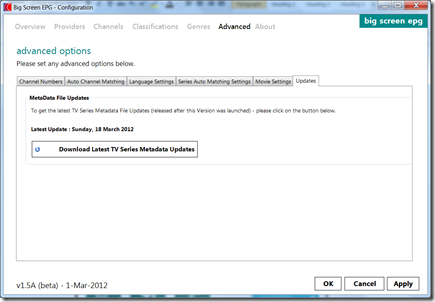
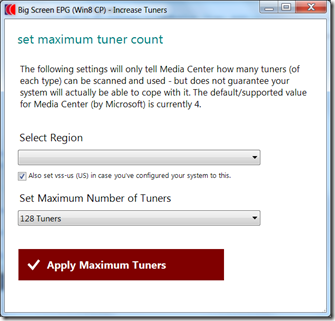
- New UI to make increasing number of tuners much easier – previously was a command line option only :


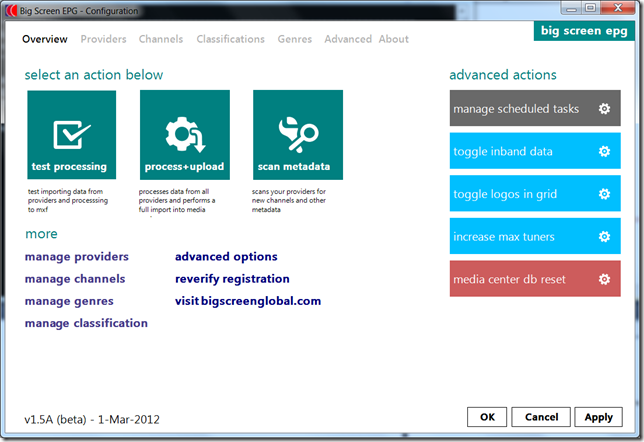
- Enhanced Metro(ish) style User Interface – this is still a work in progress – but I’ve tried (where doable) to enhance the UI to use metro style buttons and layout. There’s a few bits which still look a little ugly.Here’s the new start page for example :
- Some Bug fixes :– Fixed Support for following XMLTV providers :
– Schedules Direct sources now properly parses the Episode ID.
– Added additional support for xmltv_ns with extraction of ‘Part’ numbers
ie. “2 . 23 . 0/2 “ + “2 . 23 . 1/2– Fixed Add Provider Wizard bug where it was ignoring selection of Enabled/Disabled Channels – plus enhanced some other logic (such as supporting server based presets without passwords).

The new beta release is exactly that (a beta) – so please be sure to not do anything mission critical with it. To use it – you will still need the original setup package (this new version is only provided as a patch at this time).
It’s been tested locally – but may need some more work for release (as well as requiring a proper standalone setup package).
Enjoy!
3rd Party EPGs on 8MC (and some other interesting bits)
Today I finally got around to getting Media Center up and running on Windows 8 Consumer Preview – aka ‘8MC’ (which was delayed due to my existing ASUS USB Tuner not having correct drivers).
Although it might be a while until I actually use Win8 for real on my HTPC (reality – maybe never) – a number of users out there will no doubt dive headfirst into doing wanting to run the latest and greatest..
I was particularly interested in getting 3rd party EPG imports going (the #1 must have feature for me and for a lot of people using my products) – as it was becoming obvious that under the hood of the ‘seemingly’ identical product – certain things had changed (such as it being recompiled with .NET Framework v4 – previous versions used v2).
As suspected (due to these changes) – the latest released version of Big Screen EPG did not work, and although it reported the EPG import was complete – no imported data was not showing up at all in the system. (NB: this would be the case for all other 3rd party epg tools designed for use with Windows 7)
So hence a bit of tinkering, recompiling and the like was required (using a modified Big Screen EPG version). That is – a test of my kung-fu, pitted against the dastardly plan by Microsoft to provide no technical/developer information or release notes to the public under any circumstances. Luckily I won – and was able to get my first EPG import going. I suspect this may have been the very first successful import done by anyone outside of MSFT (as quite a few things needed to be changed) – so I proudly took a screenshot below for safe keeping :

Note that this is not EIT data – and has channel logo’s, repeat/hd flags, episode title (and all the other bits you’d want from a custom xmltv source). A little later I had all the bits going that I had in Windows 7 (including series images, full Movie Guide support with auto downloading artwork/reviews/etc).
Anyhow – for all the Big Screen EPG users out there wanting to use Win 8 CP – I will try to release something soonish (there’s a few more steps to be done for it to be packaged up + user friendly) – however for the meantime you can sleep safely in your beds knowing 8MC will in fact support 3rd party EPG’s and wasn’t ‘broken’ (when you do get around to using it).
In terms of the other Big Screen products and compatibility with 8MC – here’s the wrap :-
– I successfully Installed and used all 4 of the Big Screen 10 foot addins on Win8CP (‘Weather 2’, ‘Headlines 2’, ‘Photos 2’ and ‘Contacts 2’) – so everyone who has these products will be able to use the currently released version. I’m not going to officially offer any support (or updates) of these for Windows 8 – however they do appear to work as expected. Note that you need to install the .NET v2/v3.5 Windows features (it will prompt you during first setup) – before these addins will install properly.
– Although I’ve not tested it yet – it’s highly unlikely ByRemote will work in it’s current form (without being recompiled using .NET Framework v4 and referencing the new Win8 CP DLL’s – which hopefully shouldn’t be too difficult). I’ll have a look at that product later.
Also – for those struggling with drivers on Win8 CP (particularly tv tuner ones) – from what I’ve seen the deal is this : Win8 likes Windows 7 certified drivers but doesn’t seem to play with ones not updated since Vista Certification. This can be a problem as many of the tuner cards didn’t get Windows7 specific drivers ever written for them (such as the ASUS U3000 Mini USB stick I have) – which was acceptable as Windows 7 worked fine with Vista drivers.
Stay tuned for more..
 mobilewares
 Big Screen Blog